
If you’re aiming for your best night of sleep, AI powered sleep soundscapes can be really helpful for relaxing your mind and blocking out distracting noise. I’ve spent a lot of time experimenting with these digital sound baths, and there’s a huge range in how long people choose to listen each night. Plenty of folks wonder if there’s a perfect amount of time for listening to these sounds, or if you might see more benefits with a longer or shorter session. Let me walk you through what I’ve learned about making the most of AI sleep soundscapes and how to tailor your listening time for better rest.
Understanding AI Sleep Soundscapes: What They Are and How They Work
AI sleep soundscapes are exactly what you might expect—digital soundtracks that use artificial intelligence to generate peaceful, never-repeating audio patterns. The AI part comes in by mixing and morphing different sounds (like waves, rainfall, or soft melodies) in real time. That way, you’re not stuck hearing the same loop over and over, which actually helps your brain relax more deeply. Many apps and devices offer settings for volume, tempo, and sound style, so you can create a soundscape that matches what helps you unwind and drift off easily.
One big perk is variety. Your brain doesn’t get used to the noise as quickly, so you’re less likely to wake up when the track repeats or notice small, distracting changes. The unpredictable (but calming) nature of AI audio helps a lot of people fall asleep faster and enjoy a more restful night overall.
How Long Should You Listen To AI Sleep Soundscapes For Maximum Benefit ?
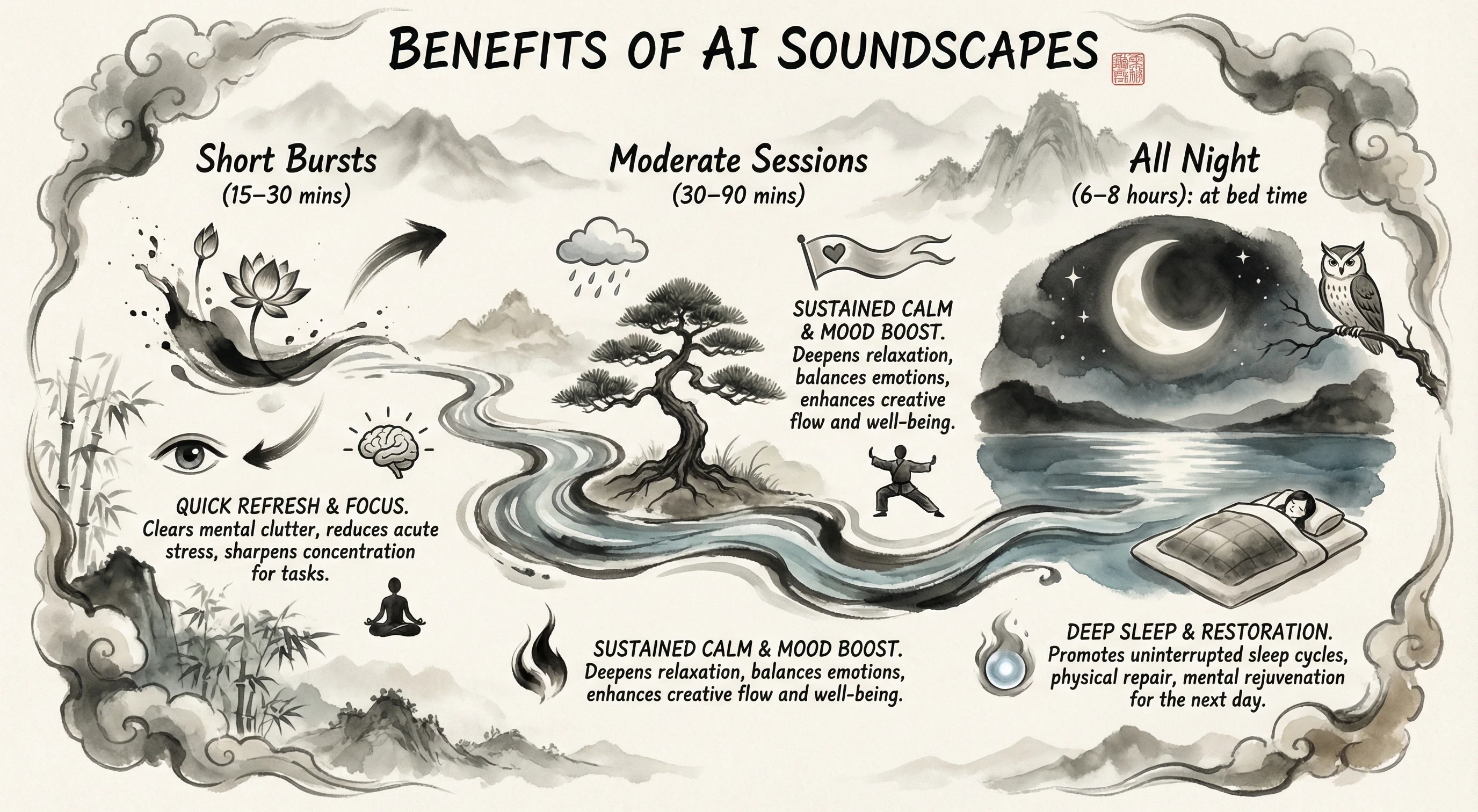
Your ideal amount of listening time with AI soundscapes depends mostly on personal preference and your specific sleep goals. There’s no single perfect answer, but here’s what research and user stories tend to show:
- Short Bursts (15–30 minutes): If your main need is winding down before bed, a short session works great. It gets your mind and body settling, giving you a smoother transition to sleep.
- Moderate Sessions (30–90 minutes): Most people prefer listening for about the time it usually takes them to drift off, maybe with a little extra buffer. Around an hour seems to hit the sweet spot, covering the period as your mind switches from being awake to a deeper sleep cycle. This is when these soundscapes really help block out small distractions and worries.
- All Night (6–8 hours): Some people run the AI soundscape all night, especially if they’re light sleepers or living with city noise. Many apps offer an allnight mode for this, and the generative AI keeps things from getting repetitive or distracting, even for hours.
If you’re just starting, I recommend trying it out for 30–60 minutes for several nights to see how your body likes it. Then adjust up or down if you notice yourself waking when the sound ends, or getting annoyed if it runs too long after you’ve nodded off.
Factors That Influence the Ideal Listening Time
Plenty of things play a role in how long you might want to listen before sleep. Here are some main points to think about as you try things:
- Your Natural Sleep Cycle: If you generally fall asleep quickly, you probably don’t need hours of sound. If you battle with a racing mind or insomnia, longer sessions are worth a try.
- Environment: Noisy neighborhoods, thin apartment walls, or unpredictable street sounds make a case for longer soundscape use. If your home is usually quiet, maybe just a bit of soothing noise at the start does the trick.
- Type of Soundscape: Some people relax more with nature sounds, while others like gentle music or abstract sound beds. The more you customize your experience, the less likely you’ll need it to play the entire night.
- Technology & App Settings: Many soundscape apps have options for fade out or timed stops. If you’re concerned about battery life, or just don’t want to wake up to sounds in the morning, don’t forget these features.
Quick Steps for Making the Most of AI Sleep Soundscapes
Figuring out the best routine for you might take some experimenting. Here’s a simple roadmap for dialing in how long to listen:
- Set Your Sleep Goal: Decide if you need help falling asleep, staying asleep, or covering disturbing noise the entire night.
- Pick a Starting Duration: The 30–60 minute mark works well for most. Set your app for this range and be mindful of how quickly you drift off and if you stay asleep through the night.
- Look for Disturbances: If the sound itself wakes you, try a shorter session or swap for a gentler soundscape. If you’re waking when the sound stops, pick a longer session or enable “allnight” mode.
- Check Your Results: After a week, check in with yourself. Are you waking up refreshed? Does it feel easier to settle at bedtime?
- Adjust as Needed: Tweak the length, try new sounds, or shift the volume until you hit your own rhythm. Everyone’s sleep habits are unique, so finding your sweet spot is what counts.
Testing out these steps for a week or two gives you a true sense of what works best for you.
Things To Consider Before Relying on AI Soundscapes for Sleep
These audio tools are helpful for lots of people, but it’s smart to keep a few things in mind before depending on AI sleep sounds nightly.
- Audio Dependency: Some people get used to needing audio every night, then struggle to sleep when it’s missing (like traveling or crashing somewhere new). Rotating which sounds you use or sometimes sleeping without audio helps your brain stay flexible.
- Device & App Limits: Phone speakers may not handle the gentle detail of a good AI soundscape. Sleep headphones or external speakers step up the quality, but watch out for tangled cords or comfort issues.
- Battery Life: Allnight sound drains devices, so make sure your phone is plugged in or consider a dedicated sleep audio device to skip late night battery drains.
- Volume Level: Too high and you might wake up during the night; too gentle and the soundscape won’t cover background noise. Aim for a “just barely there” setting that feels soothing but not distracting.
Dealing with Disruptions
If you notice the AI soundscape is waking you up—maybe due to unexpected volume jumps or sudden changes—pick a more consistent setting or app. It’s a good idea to do a dry run during the day so you know what to expect before relying on it for your night’s rest.
Tips for Getting Even More Out of AI Sleep Soundscapes
After you’ve got the basics down, try these tweaks to take things up a notch and make your sleep routine even more effective:
Try Different Sound Types: Switching up the sounds (like soft rain, ocean waves, or magical drones) keeps the experience fresh. If there’s some variety, your brain won’t get bored or start tuning out as quickly.
Schedule a Fade-Out: Apps that let sounds gradually disappear make the transition to silence more gentle, which helps avoid waking as the session wraps up.
Use Other Sleep Aids: Pairing your soundscape with relaxing routines—dimming the lights, reading, or gentle stretches—gives you better odds at a solid night’s rest.
Be Consistent: Following a steady bedtime and wakeup routine helps your brain match these sounds to the feeling of drowsiness. Over time, just turning on your soundscape can make you feel sleepy faster.
Putting these ideas into your nightly routine can give a boost to your rest and boost your well-being in the long run.
What You Can Expect With the Right Soundscape Routine
From my own testing and talking to others, here’s what tends to happen when you find a soundscape habit that clicks:
- Fall asleep more quickly, thanks to fewer distracting thoughts
- Better, more uninterrupted sleep during the night, especially for light sleepers
- Less annoyance from traffic, snoring, or neighborhood noise
- Wake up feeling more refreshed and ready for your day
It’s not magic, but a bit of experimenting can leave you with a low-effort way to boost sleep quality, even in a noisy world.
Frequently Asked Questions
I get these questions about AI sleep soundscapes a lot. Here are practical answers for anyone curious about getting started:
Question: Does listening to soundscapes all night cause any harm?
Answer: There’s no sign that a gentle AI soundscape is harmful, as long as you keep the volume low and avoid anything jarring. If you feel like you’re getting too dependent, skip a night every so often to mix things up.
Question: Can soundscapes help with insomnia?
Answer: They can help some people, especially if you have trouble turning off racing thoughts. Pair soundscapes with good sleep habits for the most benefit.
Question: What’s better, nature sounds or abstract AI sounds?
Answer: Whatever helps you relax is best. For some, nature sounds are the go-to; for others, soft music or “spacey” ambient noise does the trick. Your best choice is whatever lets you sleep without feeling irritated or distracted.
Fine-tuning the length of your AI sleep soundscape sessions really does matter for lots of people. There’s no magic number, but most see results with 30–90 minutes, or by playing soft, nonrepeating audio gently all night.
Trying different durations, sounds, and routines is the best way to figure out what leaves you most rested. Stick with whatever relaxes you and keeps you snoozing. Don’t stress over crafting the “perfect” setup—the comfort and consistency are what matter most for sleeping better every night.
“I’m confident this article gives you the clarity you need. If you have any questions or feedback, drop them in the comments.”